
Introduction
What Hwip is and how its pieces fit together.
Coding agents stop when they need you. Hwip sends the question to your iPhone or Apple Watch, with the diff, and types your answer back into the same tmux session. Approve a step with a tap, or answer in your own words.
It is an inbox for your agents' questions, not a terminal app. For a full shell, use SSH.
The pieces
- The Hwip app (App Store) — iPhone and Apple Watch. Questions, approval prompts, and the live timeline of each session. Android is coming soon.
- CLI / SDK (
@hwip/cli) —hwip installwires your agents up,hwip cc,hwip codex,hwip piand the other wrappers start an agent in a tmux session your phone can type into, and the SDK sends pushes from your own scripts. - MCP server (
@hwip/mcp-server) — exposes Hwip as tools an MCP-aware agent can call, such ashwip_ask. - Claude Code plugin — hooks, skills and the MCP server for Claude Code, installed by
hwip install.
What a question carries
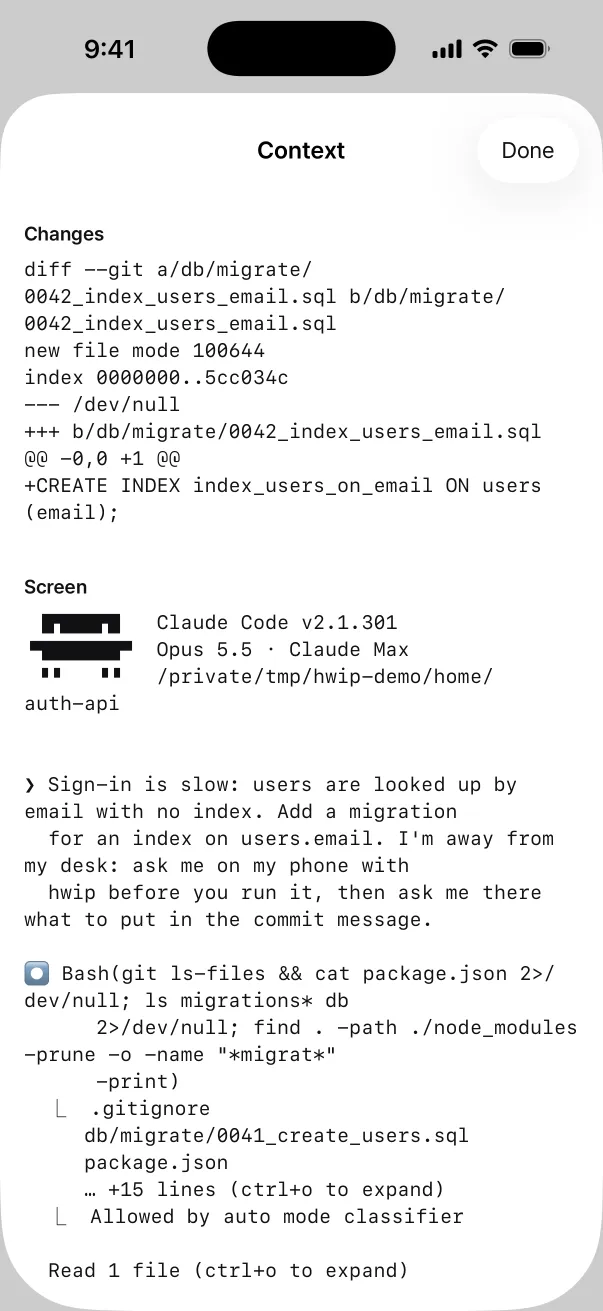
Each question brings the session's git diff and its last 60 terminal lines, so you can decide
from the lock screen. Everything is sealed on your machine with AES-256-GCM before it is sent. What
the server still sees is listed on What the server sees.
Where to start
Get started walks the whole setup: the app on your iPhone, one command on your computer, and a restart.
Then pick your agent under Agents. Claude Code, Codex CLI, Gemini CLI, pi and OpenCode each have a page that says what reaches your phone and how it is wired. The CLI section covers remote control and the SDK, the MCP section covers the tools, and the plugin section covers what Claude Code gets.