
Encryption
How pushes are sealed on your machine, what stays in the clear, and where the protection stops.
End-to-end encryption is always on. There is no switch and nothing to configure. A push's title, body and URL, a question, an answer, and a message to another computer leave this host as ciphertext, on every plan.
The exceptions are a push to a channel's subscribers (hwip notify --channel), which the server
fans out as plain text because subscribers could not open a sealed one (the CLI says so on stderr
each time), and the status notifications the server writes itself. For the full list of what the
server reads, see What the server sees.
How it works
Push bodies and long-body attachments are encrypted with AES-256-GCM. This host holds its own ECDH
P-256 keypair in ~/.hwip/device-keys.json, generated on first use. The private half never leaves
the machine: the backend stores public keys only and rejects a private-key upload.
Each push is encrypted once, and its AES key is wrapped separately for every device the account lists with a key, using ECDH against that device's public key. The title and URL move inside the ciphertext with the body.
The live path (terminal frames, your keystrokes, screen snapshots, diffs, session history) uses a second envelope sealed for one device key at a time: ECDH P-256, HKDF-SHA256 with a per-message purpose, and AES-256-GCM. A frame that fails to encrypt is dropped, never sent in the clear.
No app, no push
A push needs an app to read it. With no iPhone app signed in to the account, hwip notify and
hwip ask send nothing and say so (NO_APP_DEVICE). When an app is signed in but a send cannot be
sealed, the push is refused with E2E_REQUIRED and the reason. There is no plaintext fallback.
Pinned keys and key changes
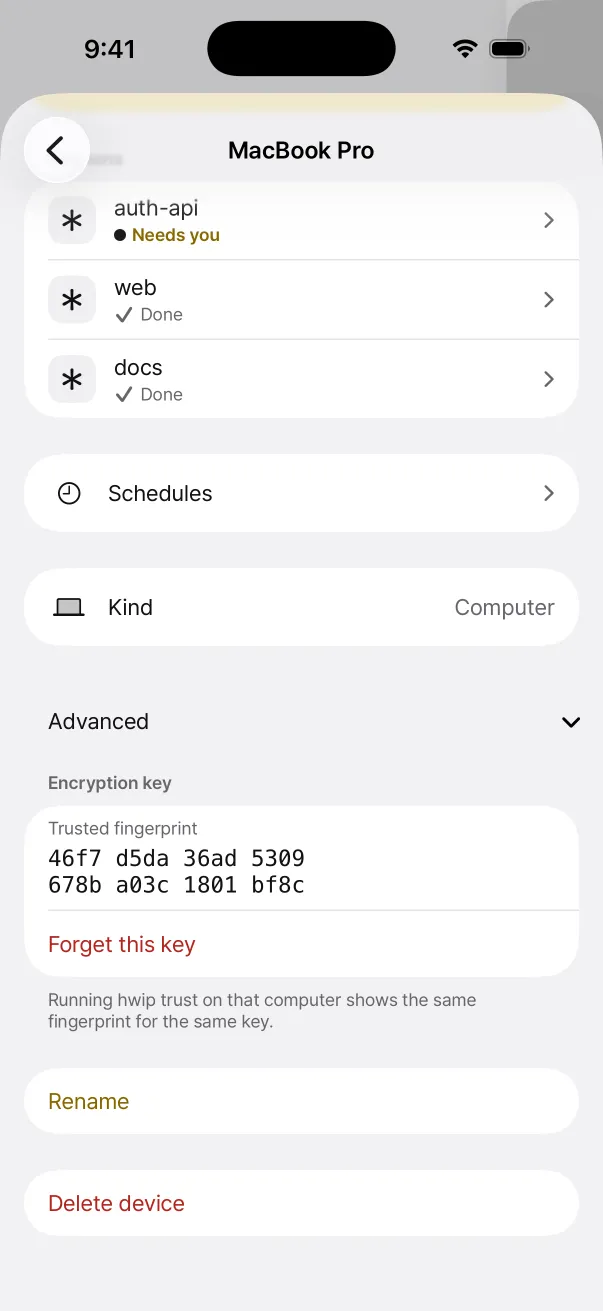
Every device on the account is pinned in ~/.hwip/trusted-devices.json the first time it is seen.
If a device later lists a different key (an app reinstall, for example), the pin is replaced, one
line goes to stderr, and the change is recorded in ~/.hwip/key-changes.json so a person sees it
at the next hwip verify, hwip trust, or hwip test. Nothing is refused for a changed key.
To check keys by eye, compare fingerprints:
hwip trust                 # this computer's fingerprint, and the pinned devices
hwip trust <deviceId>      # pin the key the account now lists for that device
hwip trust --reset         # forget every pin; each comes back as it is seen again
The app shows the same fingerprint for the same key on each device's page.
Question context
A sealed question carries what the asking session has changed (git diff against HEAD, new files
included, never a .gitignored one) and the last 60 lines of its terminal. Both are masked for
secret-looking text first, sealed for the same devices, and fetched by the app when you open the
question. Masking is best effort: a secret in a form it does not know stays in.
Switch it off for one project, or everywhere:
hwip ask-context off             # this project
hwip ask-context off --global    # every project
hwip ask-context on              # undo either
HWIP_ASK_CONTEXT=0 switches it off for one run.
Threat model
Against a passive backend, such as a leaked snapshot or an operator reading the table, the stored ciphertext and wrapped keys are useless, so push contents stay private. Four limits are worth knowing:
- No protection from an active malicious operator. Recipient public keys come from
GET /deviceson that same server, unsigned. A backend that injects a device record carrying its own key, or lists another key for a device you know, gets the message key wrapped for it and reads what is sent after that. The pin is replaced and one line says so; nothing stops it. Comparing fingerprints withhwip trustis the check. - No forward secrecy. The ECDH secret for a given sender and device pair is static, so compromising either private key opens every past push wrapped for that pair.
senderPublicKeyis unsigned, so a swapped one makes a push undecryptable. That direction fails closed rather than leaking.- Two OS users on one computer share its device id. Each has their own key, so they replace each other's on the device list, and the app warns of a changed key each time.
Messages between computers
hwip agent send always seals the message for the target computer, and the target's listener
types it by the same checks as a command from the phone. No pairing is needed: both computers just
need to be on the same account, with hwip listener (or hwip cc) running on the target. A
message that cannot be sealed is not sent.
The listener
hwip listener opens encrypted file pushes addressed to it and sealed agent.command pushes from
a device whose key checks out. It ignores every other encrypted push. Once the listener has seen a
keyed device, it refuses plaintext commands and plaintext screen requests; see
Remote control.